
Automatic cup retrieval mechanism driven by a stepper motor: 3D printed design
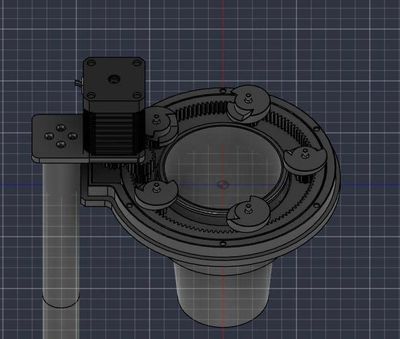
This mechanism separates exactly one cup from the stack of cups and then drops it down, each time receiving a rotation command from the stepper motor. It is designed for automatic beverage vending machines, self-service drink counters, and any place that needs to dispense cups without human hands.
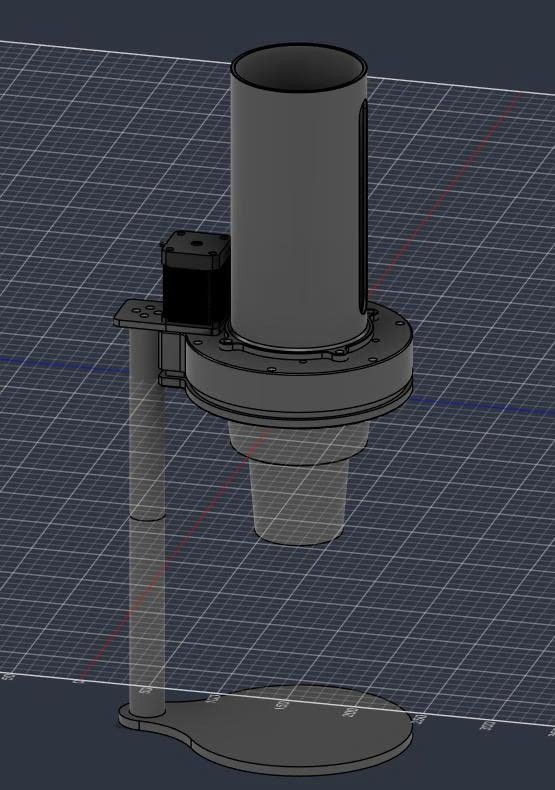
VHITEK announced this design at the CAD stage: geometry is finalized, not yet tested for printing. The two illustrations are renders from the model, not photographs of the product. Printing specifications will be added in the next article after the sample printing.
Đang tải mô hình 3D · 6.4 MB…
How the mechanism works
The stepper motor is mounted offset to one side, transmitting through a small gear engaging with the inner toothed ring that runs around the mouth of the cup holder. The toothed ring carries five grippers evenly spaced in a circle; as the ring turns, all five grippers rotate simultaneously by the same angle.
The five grippers engage with the lip of the bottom cup and twist it off from the cup above. The stack of cups above drops down one notch, and the separated cup falls through the center hole. One complete turn equals one cup.
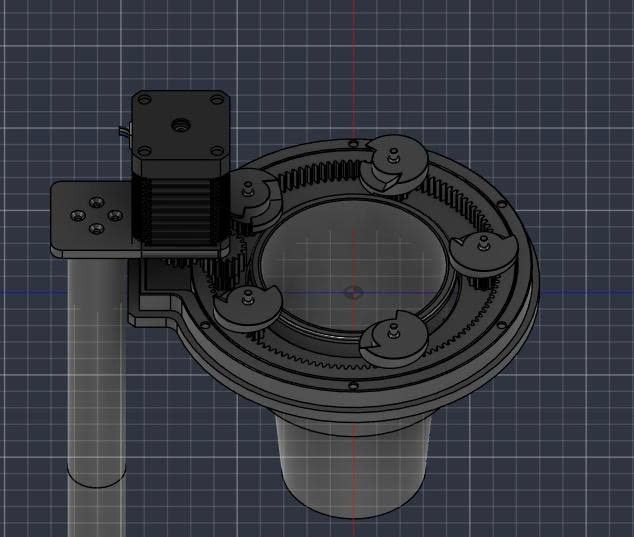
This method trades off for something valuable: only one motor for all five contact points. The cup is held and released evenly around the circumference instead of being pushed sideways from one side, reducing the chance of thin plastic cups getting stuck or warped.
Dimensions and off-the-shelf components
Measurements taken directly from the STEP file, not estimated.
Overall assembly box | 194.9 × 461.2 × 235.6 mm (including the support column) |
|---|---|
Geometric block number | 33 |
Units | millimeters |
Export standard | AP214, from Fusion |
Design time | 23/6 → 12/8/2026 |
Two items must be purchased, cannot be printed:
Components | Specifications |
|---|---|
Bearing | 623 ZZ — 3×10×4 mm, two metal end caps |
Motor | 42 mm frame stepper motor (NEMA 17) |
Screws and bolts not specified in the assembly — dimensions taken directly from the holes in the CAD file.
How to print
Printing parameters — material, layer height, fill density, orientation, support — will be announced after the sample printing. VHITEK provides measured numbers instead of estimated ones, so this part is left blank until actual results are available.
The three fittings below determine whether the rotation mechanism is smooth or stuck, and are the areas that require tolerance adjustment first:
Fitting | Requirements |
|---|---|
Toothed ring ↔ body | Sliding surface. A clearance that is too small causes sticking, too large causes play and uneven gripping of the cup |
Contour of the inner teeth | Small teeth; rough layer height rounds the teeth tips and loses fit |
Bearing seat 623 ZZ | Outer diameter 10 mm, fitting tightly — loose causes the axis to wobble |
Files and licenses
The design release is under MIT license: reuse, modify, and use for commercial purposes are permitted, just keep the copyright notice.
STEP — tệp CAD chỉ tải về được: định dạng này là mô tả hình học của CAD, trình duyệt không dựng hình trực tiếp từ nó.
The .glb at the beginning of the article is a triangular mesh generated automatically from this STEP file, meant for viewing on the page — if you want to modify the dimensions, use the STEP file, as it retains the original geometry and not a chopped-up surface.
No .stl or .3mf has been provided for direct input into the printer. Anyone who needs it can open the STEP file and then export the mesh — in Fusion, right-click on the body, Save as Mesh.